ADA website compliance explained
ADA website rules vary: Title II names WCAG 2.1 AA for governments, Title III sets no single standard. WCAG 2.2 AA is a practical benchmark for website teams.
ADA website rules vary: Title II names WCAG 2.1 AA for governments, Title III sets no single standard. WCAG 2.2 AA is a practical benchmark for website teams.
A business may have a functional website that works perfectly for most visitors but still creates barriers for people with disabilities. Websites should comply with guidelines set by the Americans with Disabilities Act Title II and Title III regulations to be accessible to all visitors. Understanding regulations and taking the necessary steps to remediate issues uncovered isn’t solely a responsibility handled by the IT department. Developers, designers, and content creators all influence whether visitors can navigate, understand, and interact with a website.
The precise legal requirements for ADA compliance depend on the organization and applicable laws. Following WCAG 2.2 AA is a recommended technical target, not a universal guarantee of legal compliance.
In this guide, we explain which ADA website accessibility requirements may apply to your organization, how WCAG standards help address accessibility barriers, and the responsibilities developers, designers, and marketers share in creating and maintaining an accessible website.
Whether current ADA regulations apply to your website depends in part on the type and size of your organization. The Web Content Accessibility Guidelines (WCAG), developed and maintained by the World Wide Web Consortium (W3C), provide technical standards for website accessibility. Furthermore, the Department of Justice (DOJ) establishes and enforces ADA regulations that may incorporate these standards.
Laws for your website differ primarily by type. Government websites operate under a different legal basis than private businesses. For state and local government websites, your jurisdiction's population also affects the applicable legal basis. Requirements also vary for private business websites.
Regulations are often updated. When modifying your organization's website, use the most up-to-date regulations. The following chart provides a summary of current ADA Regulations.
Who | Legal Basis | Technical Standard | Key Date |
|---|---|---|---|
State and local governments with populations of 50,000 or more | WCAG 2.1 AA under DOJ rule | April 26, 2027 | |
Smaller governments and special district governments | ADA Title II | WCAG 2.1 AA under DOJ rule | April 26, 2028 |
Private businesses covered by Title III | No single WCAG version universally mandated by Title III | No general federal deadline |
The Web Content Accessibility Guidelines (WCAG) provide internationally recognized guidelines to help organizations make websites available to people with disabilities, including those with difficulty seeing, hearing, navigating, or interacting with digital content. They provide criteria that developers, designers, and content creators should use to evaluate accessibility on their site. The areas covered generally fall into four principles known as POUR: Perceivable, Operable, Understandable, and Robust.
WCAG has three levels of accessibility: A, AA, and AAA. Level A provides the foundational elements needed to address accessibility barriers. Level AA adds additional requirements to address common challenges, and Level AAA represents the most rigorous level of accessibility.
Level | Purpose | Examples |
|---|---|---|
Level A | Basic accessibility requirements | Keyboard navigation, text alternatives for images |
Level AA | Addresses more significant accessibility barriers | Stronger color contrast, captions for live video with audio |
Level AAA | Highest level of accessibility | Enhanced color contrast, additional navigation options |
Government Websites Government websites have their own set of standards for ADA compliance. The U.S. Department of Justice specifies WCAG 2.1 Level AA as the technical standard for government websites covered by its ADA Title II web accessibility rule. WCAG 2.2 AA is a newer standard that covers additional challenges, including keyboard navigation, button sizes, and accessible authentication.
For organizations seeking to improve their website accessibility, WCAG 2.2 AA is the recommended level; however, meeting WCAG guidelines does not guarantee compliance with every applicable law.
New WCAG 2.2 criterion | Level | What it means in practice | Who owns it |
|---|---|---|---|
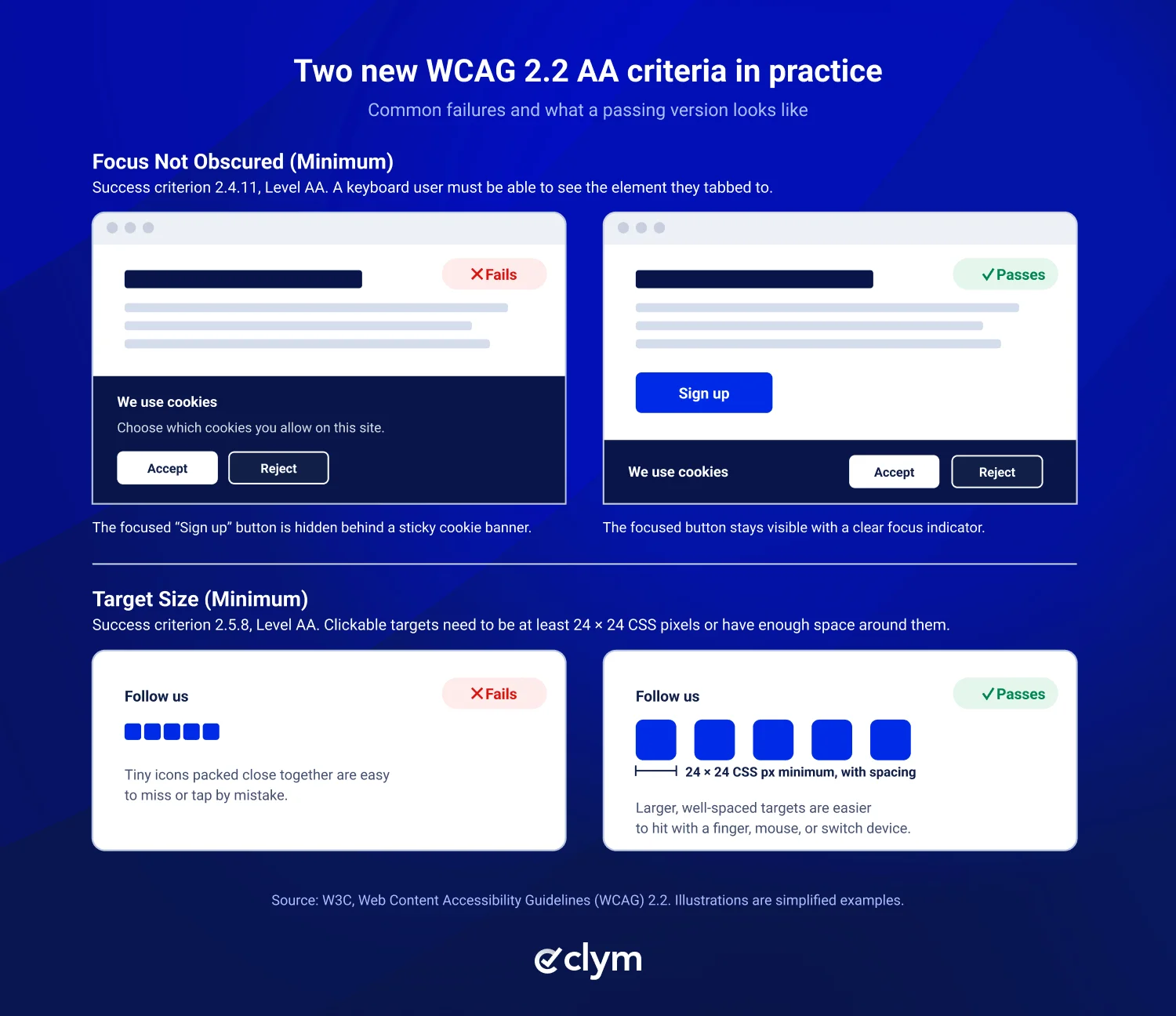
Focus Not Obscured (Minimum) | AA | Keep keyboard-focused elements visible rather than allowing menus or banners to completely obscure them. | Developers, designers |
Dragging Movements | AA | Provide an alternative way to complete actions that require dragging, such as moving items in a list. | Developers |
Target Size (Minimum) | AA | Make clickable elements large enough or sufficiently spaced apart to reduce accidental selections, subject to exceptions. | Designers, developers |
Consistent Help | A | Keep recurring help options, such as contact links or chat support, in a consistent order across pages. | Designers, marketers |
Redundant Entry | A | Avoid making users repeatedly enter the same information during a process, unless an exception applies. | Developers |
Accessible Authentication (Minimum) | AA | Make login processes accessible without requiring users to memorize passwords or solve cognitive challenges without permitted assistance or alternatives. | Developers |
WCAG 2.2 also removed one criterion from WCAG 2.1: 4.1.1 Parsing, which W3C now considers obsolete because modern browsers and assistive technologies handle markup errors on their own. For a full breakdown of what changed between versions, see Clym’s WCAG 2 checklist.
Curating an accessible website involves collaboration among website developers, website designers, and content creators. Each department plays a distinct role in contributing to the ongoing work required for upkeep of an ADA-compliant website.
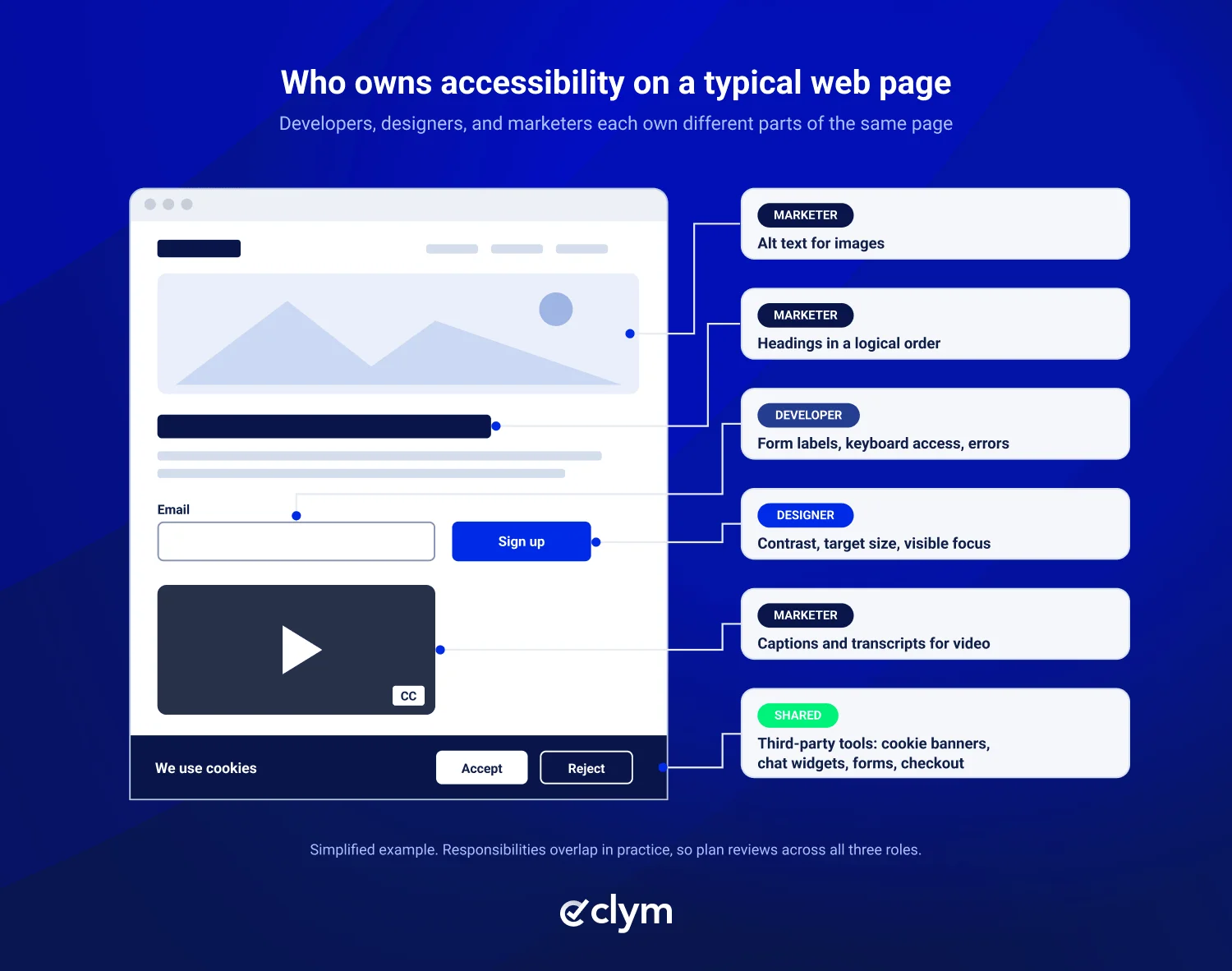
Developers often begin the process of creating an ADA-compliant website by building a foundation for ADA-compliant design. This includes building elements such as the ability to navigate the website with a keyboard or successfully execute a checkout process for a visually impaired person.
For additional support with building an ADA-compliant design, developers can use Clym’s Open Source Web Compliance Testing Tool to identify, resolve, and document web accessibility issues.
Designers work hand in hand with developers to craft an accessible website design. For example, they may implement correct button sizes and check color contrast for visually impaired users.
Marketers often add additional content to websites that needs to align with accessibility standards. This includes things like adding alt text for images, accessibility features for videos, and properly structured headlines.
Role | What they own | Quick fixes |
|---|---|---|
Developer | Semantic HTML, keyboard navigation, forms, interactive controls, assistive technology compatibility | Test unlabeled inputs, keyboard navigation, correct focus behavior |
Designer | Color contrast, readable layouts, accessible interactions, visual focus indicators | Review contrast, button sizes, focus indicators |
Marketer | Alt text, headings, link descriptions, accessible documents, multimedia content | Update image descriptions, heading structure, captions |
Can third-party website tools affect ADA website compliance?
Even if your website’s design and content meet accessibility standards, you may run into issues if third-party tools introduce barriers for people with disabilities. These tools could be cookie consent banners, live chat features, embedded videos, online forms, and checkout systems.
For example, if a visitor using a keyboard cannot navigate to your cookie consent banner to accept or reject cookies, they may be unable to interact with the website as you intended. Businesses are responsible for evaluating these third-party tools to identify and address potential accessibility barriers.
Accessibility for disabled users may not be obvious when viewing a website visually. Barriers can occur anywhere on the website, including third-party integrations. That is why regular accessibility testing should be part of your website management protocol.
An easy way to test your website’s accessibility is with Clym’s Scanner tool. This tool quickly and efficiently examines your website and identifies potential red flags for accessibility.
Websites are continuously changing with the additions of blog posts, new landing pages, design updates, plugins, and third-party integrations. However, with each change, there is the potential for a new accessibility barrier, even if the website was previously reviewed.
Maintaining accessibility requires a consistent process for addressing barriers and a clear delineation of the role different team members play in working together.
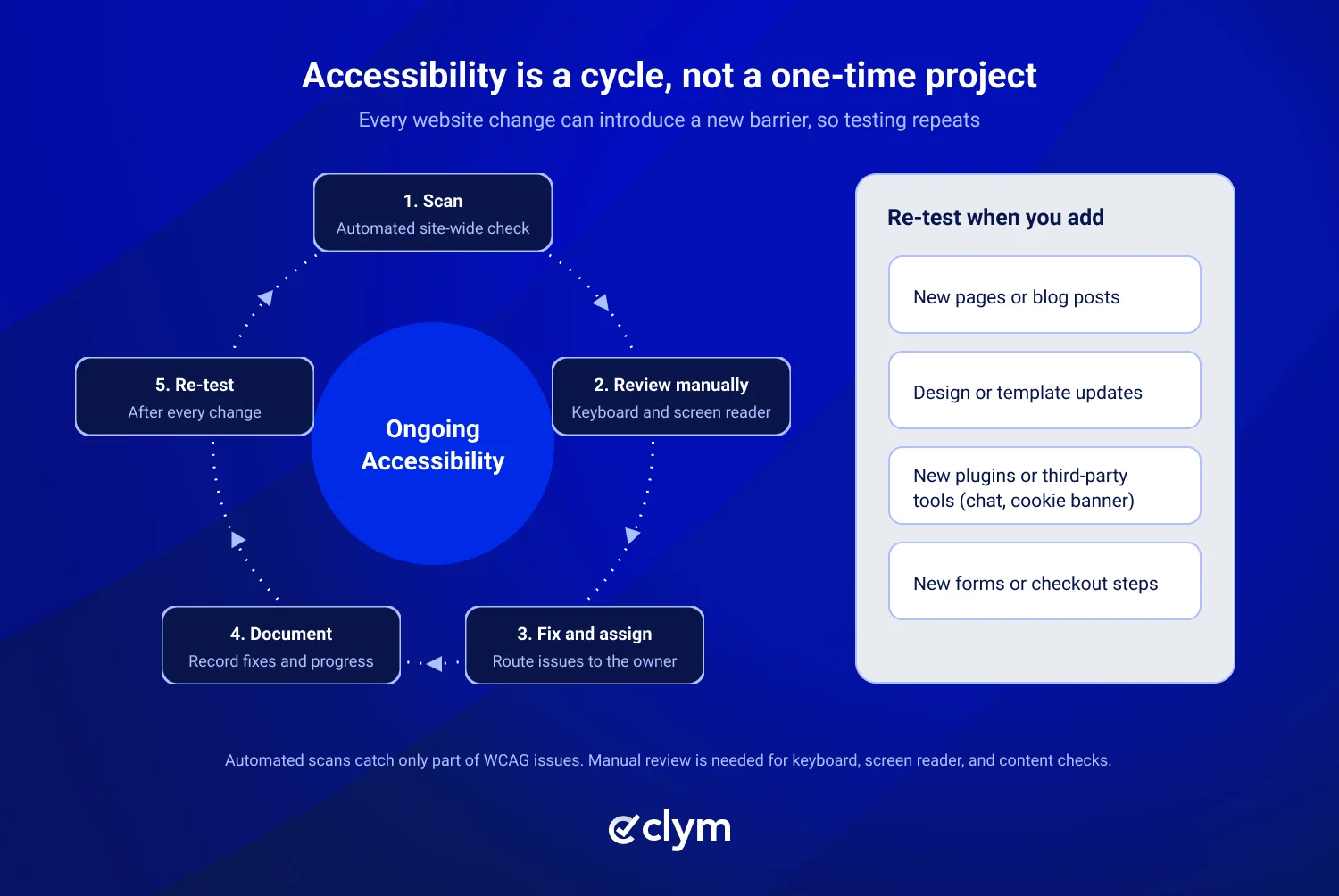
Accessible websites are the result of a coordinated effort between designers, developers, and content teams. Websites continuously evolve as content is added and updates are made, but the process of maintaining website accessibility can be easier with the help of experts.
An easy place to begin is by scanning your website to identify potential accessibility issues. Clym’s free Scanner tool will help you start the process. If you’d like more dedicated help, speak with one of our experts.
Yes. Businesses can face lawsuits if their websites create accessibility barriers for people with disabilities. Website accessibility litigation is increasing. In the first half of 2026, federal ADA Title III filings overall rose 9% to 5,006, according to Seyfarth Shaw. In 2025, 3,117 federal website accessibility lawsuits were filed, compared with 2,452 in 2024, a 27% increase.
Note: These figures reflect federal filings tracked by the reporting source, not all accessibility-related legal claims.
While filings are increasing, and there is no guarantee of protection from litigation, businesses can reduce accessibility barriers by following recognized accessibility guidelines, regularly testing their websites, and fixing identified issues.
No. Accessibility overlays and widgets may provide helpful features, but they cannot automatically make a website ADA compliant. Accessibility depends on the underlying website code, design, navigation, and content. For example, an overlay may not correct improperly labeled forms, inaccessible checkout processes, or keyboard navigation problems. Websites still require accessibility testing and appropriate corrections to address these barriers.
The time required depends on the website's size, complexity, and existing accessibility issues. A smaller website may need relatively simple updates, such as improving color contrast, adding alternative text to images, or correcting heading structures. Larger websites with complex navigation, interactive forms, and third-party integrations may require more extensive development and testing. Ongoing monitoring is also important because website updates can introduce new accessibility barriers.
Yes, small businesses may be subject to ADA website accessibility requirements. Under Title III, coverage depends on factors such as whether a business operates a place of public accommodation and the applicable legal interpretation. Small businesses should evaluate their accessibility obligations.
Learn more in Clym's article about ADA deadlines for small businesses.
No. WCAG 2.2 AA is a recommended accessibility standard, but it is not universally required by law. The Department of Justice's ADA Title II web accessibility rule specifies WCAG 2.1 AA for covered state and local government websites. Private businesses covered by Title III do not have one universally mandated WCAG version under federal ADA regulations. Organizations can use WCAG 2.2 AA as a more current technical benchmark for improving accessibility, while evaluating their specific legal obligations.

Compliance Officer
Compliance Officer | CIPP/E (IAPP) | CPACC (IAAP)
Alex is a Compliance Officer and Content Developer at Clym, where he researches and writes about everything related to data privacy and web accessibility compliance for businesses, helping them stay informed on their compliance needs and spreading awareness about making the web safer and more inclusive. When he's not writing about compliance, Alex has his nose in a book or is hiking in the great outdoors.