What an ADA demand letter means
An ADA demand letter claims a website barrier blocked a disabled visitor. Learn the common issues, how WCAG fits in, records to keep, and why widgets fall short.
An ADA demand letter claims a website barrier blocked a disabled visitor. Learn the common issues, how WCAG fits in, records to keep, and why widgets fall short.
An ADA website demand letter typically alleges that a person with a disability could not properly access or use part of a company's website.
These claims can involve website navigation, forms, images, videos, documents, checkout experiences, and other digital content. Businesses receiving a website accessibility-related demand letter should preserve evidence, investigate the specific barrier, and involve appropriate legal and accessibility professionals.
Key takeaways
An ADA website demand letter claims that some part of a website created an accessibility barrier for a visitor with a disability.
Examples can include:
These barriers are common. The WebAIM Million 2026 report found detectable WCAG failures on 95.9% of the top one million home pages, with low contrast text (83.9%), missing image alt text (53.1%), and missing form labels (51%) the most frequent.
These letters often reference Title III of the Americans with Disabilities Act and may also cite state laws.
In California, for example, accessibility claims often pair the ADA with the Unruh Civil Rights Act, which provides for statutory damages.
Accessibility claims frequently reference the Web Content Accessibility Guidelines, or WCAG.
WCAG provides technical guidance for improving digital accessibility. However, the precise legal requirements that apply to a business can depend on the law and jurisdiction involved.
For businesses open to the public, the Department of Justice's guidance on web accessibility and the ADA says online goods and services must be accessible, and it points to WCAG as helpful guidance rather than a required technical standard.
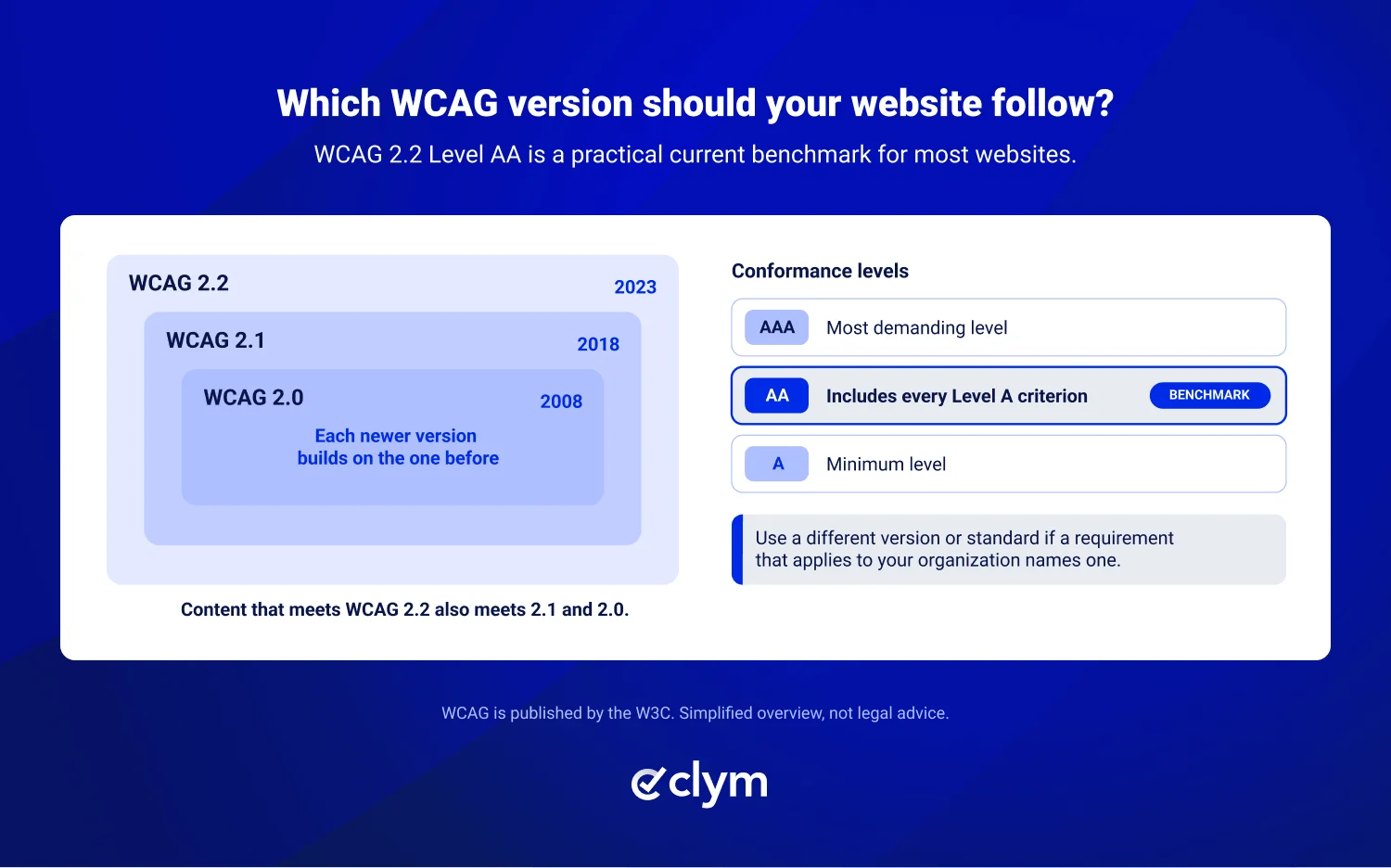
Website operators should consider using WCAG 2.2 Level AA as a practical current benchmark unless a requirement that applies to your organization names a different version or standard.
Businesses should therefore avoid treating a single automated accessibility score as a complete legal determination.
When a demand letter arrives, preserve documentation showing the website's condition and the accessibility work already performed.
Useful records can include:
Dated records are particularly useful because they show what the website looked like at a specific point in time.
Accessibility investigations should begin with the specific issue described in the demand.
If the allegation involves a form, for example, review that form and its relevant functionality. If it involves navigation or checkout, focus on those experiences first.
Barrier named in the letter | Where to look first | Records that can help |
|---|---|---|
Images without text descriptions | Product images, banners, icons used as buttons | Scan results, alt text fix tickets, page archives |
Forms that don't work with a keyboard | Contact, sign-up, and checkout forms | Manual keyboard test notes, remediation tickets |
Low color contrast | Body text, buttons, form labels | Scan results, design system change history |
Inaccessible videos or documents | Captions, transcripts, PDFs | Caption records, PDF audit reports |
Checkout that assistive technology can't complete | Cart, payment, and confirmation steps | Screen reader test notes, audit reports, release notes |
Accessibility specialists and web developers can identify and assess the technical issue, while legal counsel can advise on how to handle the allegation.
Our website demand letter guide covers the full process, from preserving the letter to responding to the claimant.
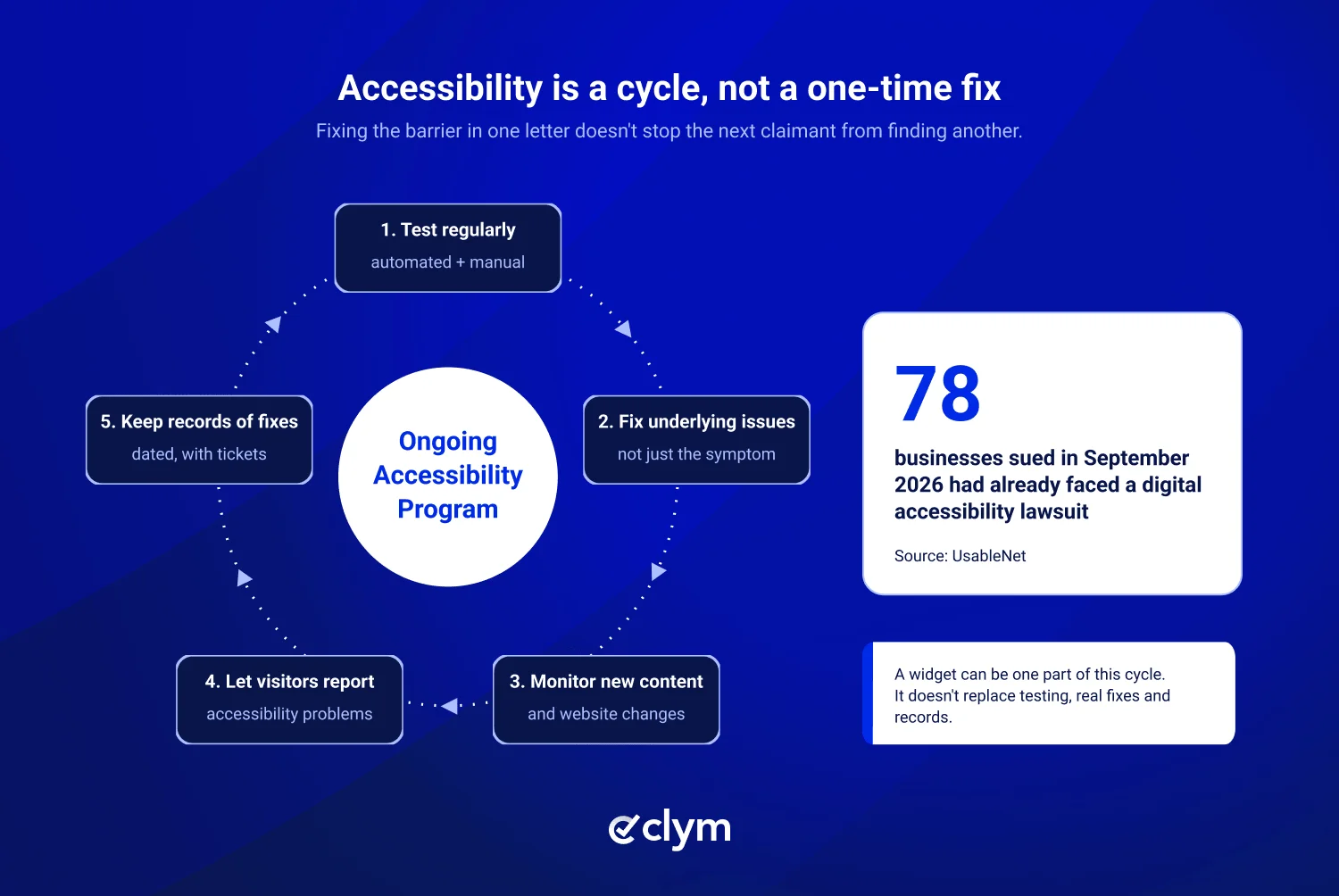
An accessibility widget may be one part of an accessibility program, but relying on a widget alone doesn't address every potential accessibility barrier.
Effective accessibility programs generally require ongoing work, including:
Website accessibility is therefore better treated as an ongoing operational process than as a one-time installation or fix.
Lawsuit data supports this. In September 2026, 91 businesses were sued for using a third-party accessibility widget, and 78 defendants had previously faced a digital accessibility lawsuit, according to UsableNet. For the bigger picture, see our overview of ADA website accessibility lawsuits.
An important distinction for businesses is that accessibility compliance and website privacy compliance address different risks.
Improving accessibility does not automatically resolve questions about pixels, analytics, consent, or tracking technologies. Likewise, implementing a privacy or consent system does not make a website accessible.
A business that receives a website demand letter should first identify the type of claim and preserve records relevant to that allegation.
The key is documentation. Consistent accessibility testing, records of fixes, visitor reporting processes, and website change histories can make it much easier to understand and respond to future claims.
How Clym can help: Clym's accessibility widget can be one part of your program, alongside accessibility testing and audit tools that combine automated and guided manual WCAG testing and generate VPAT reports. An accessibility statement and an issue-reporting tool let visitors flag barriers, and each report adds to the dated record an investigation depends on.
Disclaimer: This article is for informational purposes only and does not constitute legal advice. Clym is not a law firm and does not provide legal advice. Consult a qualified legal professional for guidance specific to your business.
If your business is open to the public, the Department of Justice says the ADA generally applies. Title III has no single technical standard for private businesses, and court outcomes vary by jurisdiction, but WCAG is the reference most claims cite.
Start with an automated scan to find common issues such as missing alt text and low contrast, then add manual testing with a keyboard and a screen reader. Automated tools catch only part of the picture, so no scan alone can confirm your site meets a legal standard. Keep dated reports of every test.
Yes. Fixing the barrier named in one letter doesn't stop another claimant from finding a different one. Sources have reported that 78 of the businesses sued in September 2026 had already faced a previous digital accessibility lawsuit. Ongoing testing, fixes, and records make it easier to respond if another claim arrives.
An accessibility statement can help, but it isn't a defense on its own. It tells visitors your accessibility goals, known limitations, and how to report a problem. Publish one as part of real accessibility work, keep it accurate, and talk to legal counsel before changing public statements while a claim is open.
Using WCAG 2.2 Level AA as a practical current benchmark can be helpful unless a requirement that applies to your organization names a different version or standard. The W3C recommends using the latest version, and content that meets WCAG 2.2 also meets the earlier 2.1 and 2.0 versions, so you don't need to choose between them.

Chief Financial Officer
Michael is an experienced C-suite executive who has spent his career guiding organizations through an ever-evolving regulatory landscape. After starting his career at Ernst & Young, Michael worked as a CFO with large, global organizations before co-founding Clym to assist organizations of all sizes with their website regulatory compliance needs.